
Focus To-Do
Plan clearly. Focus deeply.
Get the extension
What Focus To-Do does
Focus To-Do – Pomodoro Timer & Task Manager
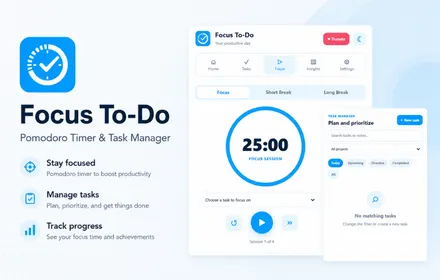
Focus To-Do combines a powerful task manager with a customizable Pomodoro focus timer to help you plan your day, stay focused and get more done.
Create tasks, organize projects, set priorities, add subtasks and reminders, track focus sessions and review your productivity from one clean browser workspace.
Key Features
- Pomodoro focus timer
- Task manager and to-do list
- Quick-add tasks
- Due dates and due times
- High, normal and low priorities
- Custom projects
- Tags and notes
- Subtasks
- Estimated Pomodoro sessions
- Recurring tasks
- Daily, weekday, weekly and monthly repeats
- Task reminders
- Focus, short break and long break modes
- Custom focus duration
- Custom break duration
- Automatic break start
- Automatic focus start
- Desktop notifications
- Sound alerts
- Focus session tracking
- Daily productivity statistics
- Weekly productivity insights
- Focus minutes chart
- Project productivity breakdown
- Completed task tracking
- Focus streak tracking
- Search and filter tasks
- Today, upcoming, overdue and completed filters
- Light and dark themes
- Import and export backups
- Optional preference sync between Chrome devices
- Keyboard shortcuts
Plan Your Day
Create and organize tasks directly from the extension.
Add a task quickly from the dashboard or open the detailed task editor to configure:
- Due date
- Due time
- Project
- Priority
- Estimated focus sessions
- Recurrence
- Tags
- Notes
- Subtasks
Your dashboard keeps today's most important tasks easy to access.
Pomodoro Focus Timer
Use the built-in Pomodoro timer to work in focused sessions followed by short or long breaks.
The default workflow includes:
- 25-minute focus sessions
- 5-minute short breaks
- 15-minute long breaks
You can customize each duration to match your preferred workflow.
Focus on a Specific Task
Choose an active task before starting a focus session.
Completed Pomodoro sessions are tracked against that task so you can compare your estimated focus sessions with your actual progress.
Smart Task Reminders
Set a due date and time to receive desktop task reminders.
Reminder notifications help you keep track of important tasks without constantly checking your to-do list.
Recurring Tasks
Create repeating tasks for routines and ongoing responsibilities.
Supported recurrence options include:
- Daily
- Weekdays
- Weekly
- Monthly
Organize Tasks with Projects
Create custom projects for different areas of your work and life.
Default categories include:
- Personal
- Work
- Study
- Health
You can create additional projects whenever needed.
Track Your Productivity
Focus To-Do provides useful productivity insights so you can see how your work is progressing.
Track:
- Completed tasks
- Focus sessions
- Focused minutes
- Daily progress
- Day streak
- Weekly performance
- Focus minutes by day
- Productivity by project
Search & Filter Tasks
Find tasks quickly using search, project filters and task status views.
Available filters include:
- Today
- Upcoming
- Overdue
- Completed
Custom Timer Workflow
Adjust the focus timer to match your own productivity routine.
Configure:
- Focus duration
- Short break duration
- Long break duration
- Sessions before a long break
- Auto-start breaks
- Auto-start focus sessions
- Desktop notifications
- Sound alerts
Backup Your Data
Export your Focus To-Do data as a backup and import it again when needed.
Preferences can also optionally sync between Chrome devices through browser sync storage.
Built for Focused Work
Focus To-Do is useful for:
- Students
- Remote workers
- Freelancers
- Developers
- Designers
- Content creators
- Office professionals
- Anyone using the Pomodoro technique
Whether you need a focus productivity tool, focus timer, Pomodoro timer, study focus tool or browser-based task manager, Focus To-Do combines your tasks and focused work sessions in one place.
Up and running in minutes.
Install
Add the extension to your browser in one click.
Pin it
Pin it to your toolbar for quick access.
Use it
Open the tool on any supported page and go.
Done
Get your results, export or save locally.
COMMUNITY REVIEWS
What users are saying.
0 published reviews
Be the first to review
Share how this extension helps your workflow.
LEAVE A REVIEW
Share your experience.
Sign in to your Nextools account to leave a review.
Sign in to reviewSimilar extensions
Chat Translator Unlimited
Remove the daily limit and translate unlimited chat messages on every site, in 1...
View details →
AD Block Master
Block intrusive ads, trackers, pop-ups and distractions with a fast, private, 10...
View details →
Allow Copy +
Restore text selection, copying and right-click on websites that block them — pr...
View details →
Tab Auto Refresh
Automatically refresh any tab on your schedule with quick presets, visual countd...
View details →Ready to use Focus To-Do?
Plan clearly. Focus deeply.
